


Ipepul
Talking Desktop Calculator | NDIS Low Vision Aid
Talking Desktop Calculator | NDIS Low Vision Aid
Couldn't load pickup availability
NDIS Goals & Independence
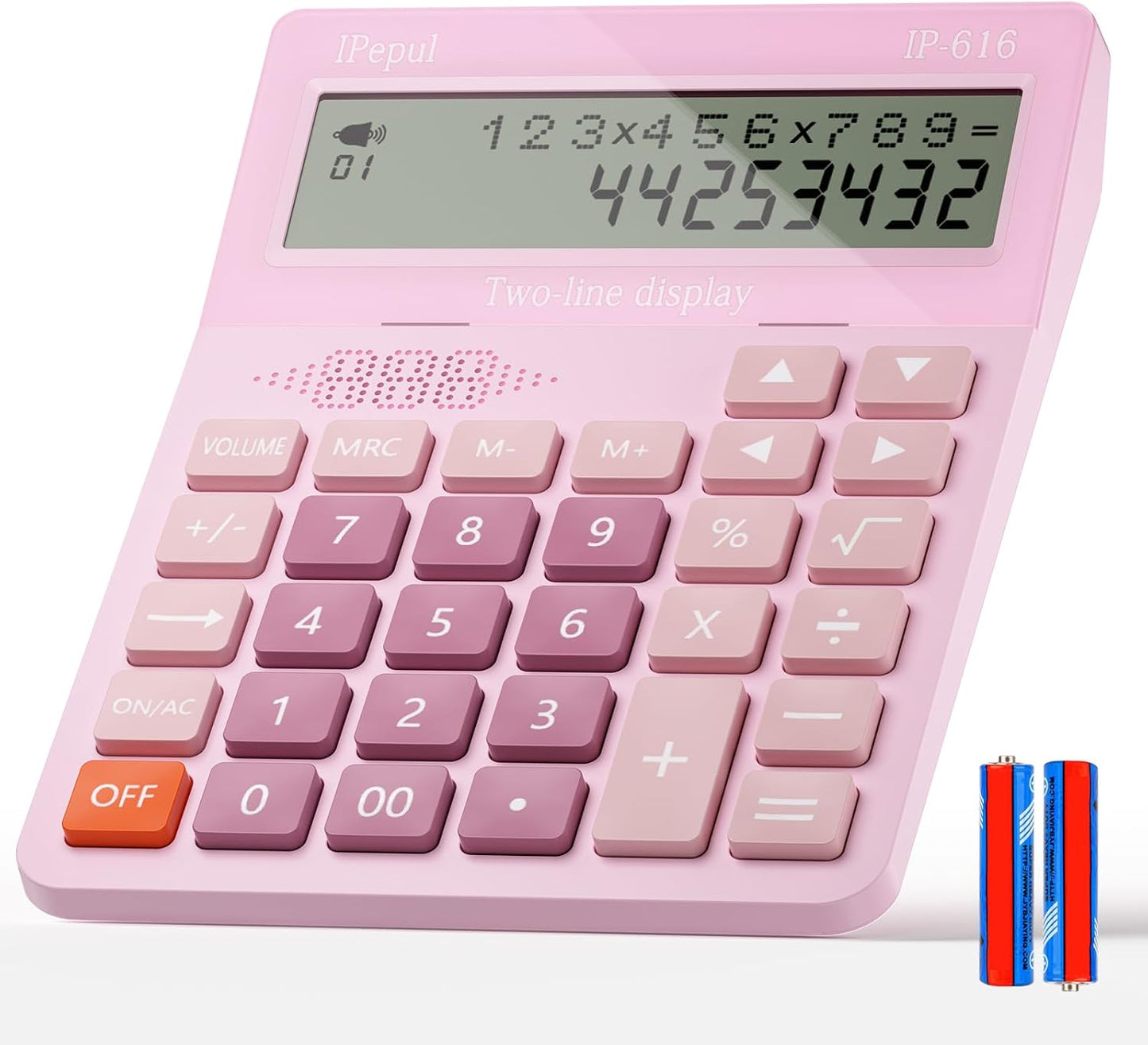
- Auditory Voice Readout: Announces numbers and calculation results clearly aloud, providing immediate auditory confirmation for blind or low-vision users.
- Dual-Line Entry Verification: Displays both current inputs and previous calculations simultaneously, supporting participants with memory loss or dyscalculia to review their work.
- Ergonomic 45-Degree Screen: Set at a fixed angle to eliminate overhead glare and reduce neck strain during seated or standing desktop activities.
- Oversized Tactile Keys: Large, responsive buttons provide generous target areas, aiding users with hand tremors, arthritis, or fine motor coordination challenges.
- Check & Correct Memory Review: Allows users to easily step backward through previous entries to check and adjust figures without restarting the entire calculation.


Supports That Work Together
Manage daily budgeting, personal finances, and educational mathematics independently with the Ipepul Talking Desktop Calculator. Classified as Low Cost Assistive Technology, this accessible calculating tool is designed to support NDIS participants living with vision impairments, low vision, dyscalculia, executive dysfunction, or fine motor challenges.
Standard calculators rely entirely on small, unlit screens and tiny buttons, creating significant barriers for users with visual or physical impairments. The Ipepul Talking Calculator addresses these challenges by incorporating an audible voice broadcast function that clearly reads out every number pressed and final calculation results aloud. Featuring a large, 45-degree angled 12-digit dual-line LCD screen, it displays both the current input and previous calculations simultaneously, allowing users to cross-check their entries effortlessly. Oversized, tactile buttons provide a generous target area for participants with hand tremors or reduced grip dexterity, while the memory recall and check-and-correct features ensure accuracy and confidence during independent daily living tasks.
How This Device Supports NDIS Participants
-
Auditory Feedback & Low-Vision Support: Reads out entered digits and final results aloud, enabling participants who are blind or have low vision to perform calculations accurately without relying on sighted assistance.
-
Dual-Line Visual Verification: The 2-line display shows both the entry history and current calculation at the same time, assisting participants with dyscalculia or short-term memory deficits to track and verify their math steps.
-
Ergonomic Postural Alignment: The fixed 45-degree angled screen minimises overhead glare and neck flexion, providing an accessible viewing position whether the user is seated or standing.
-
Fine Motor Target Accommodating: Large, raised buttons offer high tactile feedback and a wide surface area, making it easier for users with hand tremors, arthritis, or limited dexterity to press keys without accidental double-entries.
Key Features & Benefits
-
Clear Voice Broadcast Function: Audibly announces entries, operations, and results to provide instant auditory confirmation (includes on/off toggle for quiet environments).
-
Dual-Line 12-Digit LCD Screen: Displays current inputs on one line and previous calculations or running totals on another for step-by-step entry checking.
-
45-Degree Fixed Screen Angle: Reduces glare and neck strain, ensuring clear visibility from multiple seating angles.
-
Oversized Tactile Keys: High-response, large buttons prevent accidental mispresses for participants with fine motor limitations.
-
Check & Correct Memory Recall: Allows users to step back through previous entries to review, verify, or correct calculations without restarting the entire sequence.
-
Essential Functional Keys: Includes dedicated keys for square root (√), memory recall, clear/all-clear, and manual power-off.
Meticulous Specifications
-
Brand: Ipepul
-
Product Type: Talking Desktop Calculator
-
Display: 12-Digit Dual-Line LCD Display
-
Display Angle: Fixed 45-Degree Ergonomic Angle
-
Audio Feature: Clear Voice Broadcast (On/Off Toggle)
-
Key Design: Oversized, Responsive Buttons
-
Memory & Review: Check & Correct / Memory Recall Functionality
-
Special Keys: Square Root (√), Clear/All-Clear, Manual Power-Off
-
Dimensions: Standard Desktop Format
-
Safety Warning: Contains a button/coin cell battery. Hazardous if swallowed; keep out of reach of small children.
Package Includes
-
1 x Ipepul Talking Desktop Calculator
-
1 x User Manual
Funding & Eligibility
This product is designed to support daily living goals and is generally compliant with Core - Consumables funding.
- Support Item Name: Low Cost AT - Vision Related AT
- Support Item Number:
03_220300911_0113_1_1 - Budget Category: Core - Consumables
How to Order:
- Plan Managed: Add to cart and select "NDIS Checkout". This generates a formal tax invoice for your Plan Manager to pay via email.
- Self Managed: Purchase online for an instant tax invoice, or use "NDIS Checkout" if you prefer an invoice to upload to the MyPlace portal before paying.
- NDIA (Agency) Managed: Use the "NDIS Checkout" to generate a quote. We will then arrange a service booking (endorsement might be required).
*Participant's funding eligibility is subject to their individual NDIS plan goals.